 ObjectUI
Dashboard-Level Filters
A dashboard often needs one top-level filter — a date range, a region select — that drives several charts at once. ObjectUI models this as a dashboard-level parameter, not a shared dataset:
- The filter control and its value live on the dashboard — hosted as dashboard-level variables (the page/dashboard variables primitive).
- Each widget declares which of its own fields a filter binds to via
filterBindings— a small mapping, not a copied query. - At render time the dashboard broadcasts the active values into every
bound widget's own query,
AND-combined with the widget's ownfilter.
Charts stay inline and self-contained; one place owns the filter; each chart edit stays local.
Working examples: the schema catalog ships a
plugin-dashboard/filtered-dashboardexample plus variants for dynamic options, text/number/lookup filter types, widgets over two datasets, thetargetWidgetsallow-list, and date presets with a custom range. Every widget in them binds adataset, exactly as the tutorial below does. They are presentation examples — the filter declarations are what they teach. The docs gallery draws them with no application behind it by answering each dataset query with placeholder rows that no filter reaches, so the numbers on the page are not real.
Tutorial: from zero to a filtered dashboard
Step 1 — a plain dashboard
Start from two charts over different datasets. Without filters they always show everything:
{
  "type": "dashboard",
  "columns": 2,
  "widgets": [
    {
      "id": "invoices_by_status",
      "title": "Invoices by Status",
      "type": "bar",
      "dataset": "invoices",
      "dimensions": ["status"],
      "values": ["count"]
    },
    {
      "id": "accounts_signed",
      "title": "Accounts Signed",
      "type": "line",
      "dataset": "accounts",
      "dimensions": ["signed_month"],
      "values": ["count"]
    }
  ]
}
Where a widget's data comes from
A widget binds a semantic-layer dataset (ADR-0021) — "dataset": "invoices"
— and selects its dimensions and values from it by name. It never carries
rows. Filters scope that dataset query: the dashboard merges the scoped filter
into it as runtimeFilter.
Not an authoring surface: inline widget data.
options.data(whether an array of rows or a{ "provider": "object", … }query),options.xField/options.yField, a metric'soptions.value/options.description/options.trend, and acomponentchart'schartType/xAxisKey/seriesare not dashboard widget keys.@object-ui/types' strict authoring face (StrictAnyComponentSchema) refuses each of them by name, and@objectstack/specrequiresdataseton every widget. The renderer still draws a stored widget that carries them, but that path is renderer-internal (ADR-0021), not something to author against: bind the widget to a dataset. One stored form no longer draws at all: a single-value widget (metric,gauge,solid-gauge,kpi,bullet, or a widget with notype) whoseoptions.datais a{ "provider": "object", … }query shows the retired-format prompt below instead of its number (objectui#11525), as apivotwidget with that query already did. And one key no longer draws on any widget:options.description, the metric sub-caption, is retired at both ends (objectui#11389), so a stored one draws nothing. A widget's one authored description iswidget.description, the card-header subtitle.
Retired: the top-level inline analytics shape.
object+categoryField/valueField/aggregateon the widget itself (and the pivotrowField/columnFieldpair) was removed — the renderer no longer reads those keys, and a stored widget still carrying them renders a visible "This widget uses a retired data format. Edit it to bind a dataset." prompt instead of a chart. Rebind such a widget to adataset(select itsdimensionsandvaluesby name).@objectstack/specrefuses the retired shape at publish, so this is not a soft deprecation.
Step 2 — add the built-in date range
Declare dateRange at the dashboard level. A preset/custom date-range control
appears in the filter bar above the widgets:
{
  "dateRange": {
    "field": "created_at",
    "defaultRange": "last_30_days",
    "allowCustomRange": true
  }
}field— the default field the range applies to on every bound widget (falls back tocreated_atwhen omitted).defaultRange— the initially selected preset:today,yesterday,this_week,last_week,this_month,last_month,this_quarter,last_quarter,this_year,last_year,last_7_days,last_30_days,last_90_days, orcustom(starts empty and lets the user pick). When omitted, the default@objectstack/specdeclares for this key applies (this_month), so a baredateRange: { "field": "created_at" }opens filtered to the current month, not unfiltered.allowCustomRange— offer a "Custom…" item that opens a from/to calendar (defaulttrue).
dateRange is the @objectstack/spec DashboardSchema.dateRange shape, taken
by reference on both the validator and the TypeScript type: a preset name
outside the list above, or any other key inside the object (preset, range,
dateField, …), is refused at validation rather than silently ignored.
Presets stay symbolic until query time: they compile to date-macro tokens
({30_days_ago}, {current_month_start}, …) that each widget resolves
exactly like hand-authored widget filters — so a dashboard saved today still
means "last 30 days" tomorrow.
Step 3 — add a global filter
Add a globalFilters entry. Each entry renders one control in the filter bar:
{
  "globalFilters": [
    {
      "name": "region",
      "field": "region",
      "label": "Region",
      "type": "select",
      "options": [
        { "value": "EMEA", "label": "EMEA" },
        { "value": "APAC", "label": "APAC" },
        { "value": "AMER", "label": "AMER" }
      ]
    }
  ]
}name— the stable filter name: the variable key the value is published under, and the key widgets reference infilterBindings. Defaults tofield. ("dateRange"is reserved for the built-in date range.)field— the default field the filter applies to on bound widgets.object— optional: the objectfieldlives on. Declaring it opts the filter into that object's translations: its field label and option labels resolve through the samefields.<object>.<field>translation-bundle convention lists and forms use, withlabelas the fallback (see i18n). Not the same key asoptionsFrom.objectbelow, which names the object dynamic options are fetched from.type— the control type:text,number,select,lookup, ordate.
| Type | Control | Generated condition |
|---|---|---|
text | input | { field: { "$contains": value } } |
number | numeric input | { field: value } (equality) |
select / lookup | dropdown | { field: value } (or $in for arrays) |
date | preset/custom range | { field: { "$gte": from, "$lte": to } } |
A date filter's defaultValue is a string, and exactly three spellings
are accepted:
- a preset name from the
defaultRangelist above ("last_7_days") — it is lifted to that preset's range, the same as picking it in the control; - an ISO date (
"2026-01-15") — equality on that day; - a date-macro token (
"{today}","{7_days_ago}") — resolved at query time like any other filter token.
Anything else — a misspelled preset such as "last_7_dayz" — is skipped,
and the runtime logs a console.warn naming the filter and the value. It is
deliberately not compared as-is: field = "last_7_dayz" matches no row, and
the widget would render a perfectly healthy-looking 0.
Static options are @objectstack/spec object pairs —
{ "value": "amer", "label": "AMER" }, where label is a string or an inline
per-locale map ({ "en": "AMER", "zh-CN": "美洲" }). This is the only form the
platform accepts: a dashboard is validated against GlobalFilterSchema when it is
published, and anything else is refused there. objectui's own validator
(@object-ui/types, which objectui validate runs) uses the same spec schema, so
it refuses the same documents before they reach the platform.
Not accepted: the bare-string shorthand.
"options": ["EMEA", "APAC"]is refused byGlobalFilterSchemaat publish, and the runtime no longer lifts it either (objectui#4356): a bare-string member yields no option, so a stored dashboard authored this way renders that filter with an empty option list, and in development a singleconsole.warnnames the filter and the dropped members. Rewrite each stringXas{ "value": "X", "label": "X" }.
Options can also be fetched from an object at runtime:
{
  "name": "industry",
  "field": "industry",
  "label": "Industry",
  "type": "select",
  "optionsFrom": {
    "object": "accounts",
    "valueField": "industry",
    "labelField": "industry"
  }
}object, valueField and labelField are all required; when the options have
no separate label column, name the value field again, as above. An optional
filter narrows the source records and is a filter-condition object
({ "status": "active" }), not an array.
With a dataset-capable data source, optionsFrom resolves distinct values
server-side (a GROUP BY over the source object), so the option list is
complete regardless of row count. Data sources without dataset queries fall
back to a best-effort client-side dedupe over the first 200 records.
Step 4 — bind each widget's own fields
By default every filter applies to its own field on every widget. When a
widget stores the concept under a different field — or should ignore a filter
— declare filterBindings on the widget:
{
  "widgets": [
    {
      "id": "invoices_by_status",
      "type": "bar",
      "dataset": "invoices",
      "dimensions": ["status"],
      "values": ["count"]
    },
    {
      "id": "accounts_signed",
      "type": "line",
      "dataset": "accounts",
      "dimensions": ["signed_month"],
      "values": ["count"],
      "filterBindings": { "dateRange": "signed_at", "region": "sales_region" }
    },
    {
      "id": "total_invoices",
      "title": "Total Invoices (all regions)",
      "type": "metric",
      "dataset": "invoices",
      "values": ["count"],
      "filterBindings": { "region": false }
    }
  ]
}
Binding rules, in precedence order:
filterBindings[name]as a string — apply the filter to that field.filterBindings[name]: false— opt this widget out of that filter.- Legacy
targetWidgetson the filter — when set, only listed widget ids get the default binding (an explicitfilterBindingsentry still wins). - Otherwise the filter applies to its own
field(the built-in date range defaults todateRange.field ?? 'created_at').
That's the whole feature: changing any filter live re-scopes every bound
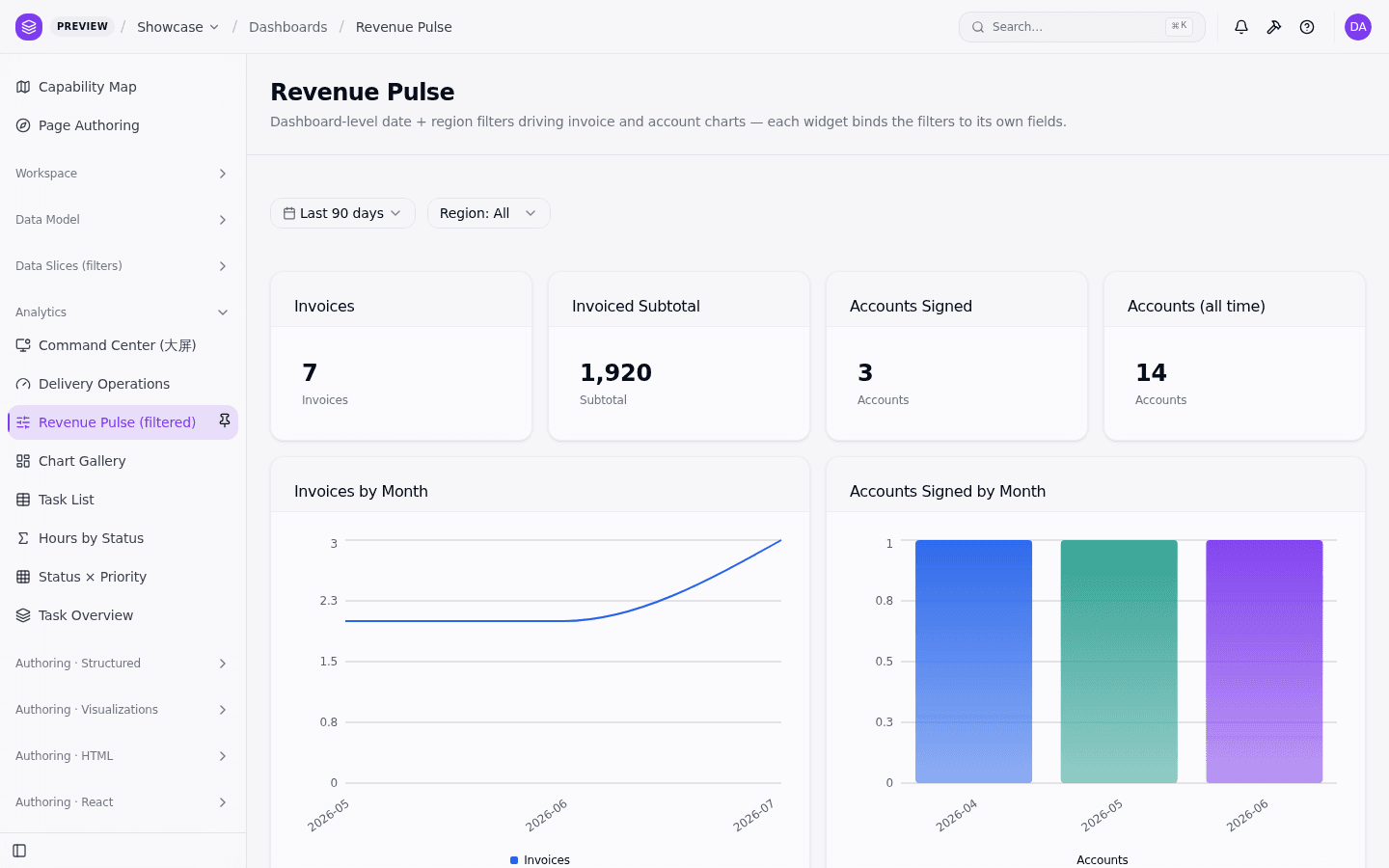
widget, each against its own field. Here it is running in the showcase
app's Revenue Pulse dashboard — the date range's default field is the
invoice issued_on, account widgets re-map it to signed_on, and the
"Accounts (all time)" KPI opts out of both filters:
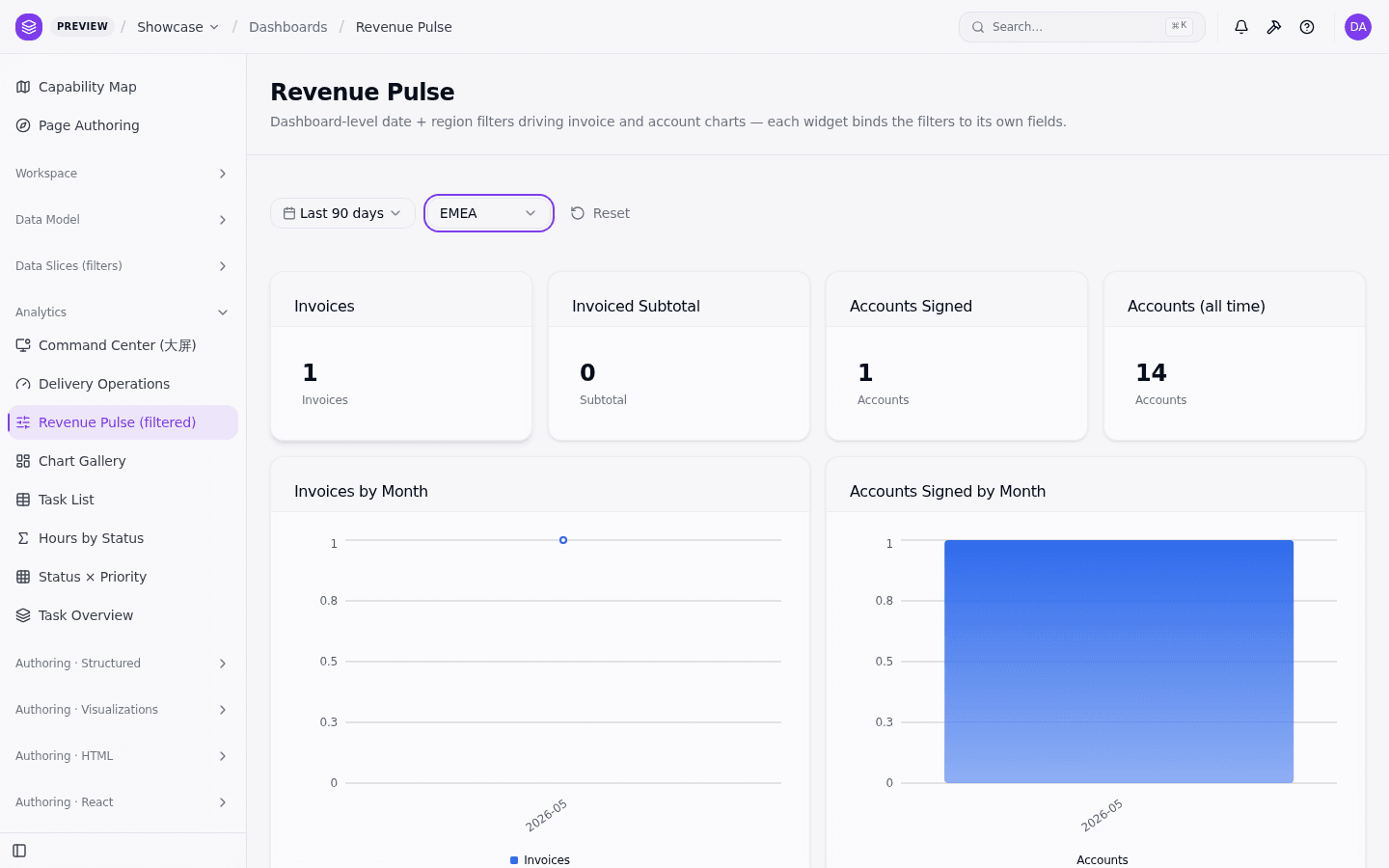
Selecting EMEA re-scopes every bound widget live (invoices via their own
region, accounts via sales_region), while the opted-out KPI holds steady —
and a Reset button appears once any filter deviates from its default:
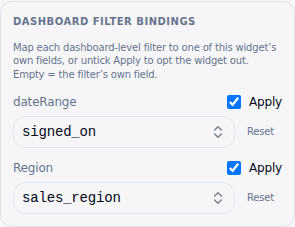
Bindings can also be edited visually: the Studio dashboard widget inspector shows a Dashboard filter bindings section (one row per declared filter) with an Apply toggle (opt-out) and a field picker for the override — no JSON editing required.
Reading filter values in expressions
Filter values are hosted as dashboard variables, so any widget expression can
read them under the page. scope, keyed by the filter's name:
{
  "type": "text",
  "content": "Region: ${page.region || 'All'}"
}
The built-in date range is an object under page.dateRange — a preset selection
is { "preset": "last_30_days" }, a custom range is
{ "from": "2026-01-01", "to": "2026-03-31" } (either bound may be absent).
Dataset widgets
Every widget is bound to a semantic-layer dataset, and the dashboard scopes
each one the same way: it merges the scoped filter into the widget's filter,
which the dataset widget forwards to the dataset query as runtimeFilter.
Widgets over different datasets mix freely on one filtered dashboard — the
plugin-dashboard/filtered-dashboard-dataset-widgets catalog entry binds two
widgets to a sales dataset beside one bound to invoices, and each is scoped
through its own query.
Nested variable scopes
When a filtered dashboard is embedded inside a Page that declares its own
variables, the two scopes merge: inside the dashboard subtree, page.*
resolves the outer Page's variables plus the dashboard's filter values, and a
dashboard filter only shadows an outer variable that has the same name.
Writes route to the scope that defines the variable — setting an outer-page
variable from inside the dashboard updates the outer scope, so both subtrees
stay in sync.
Known limitations
- A binding is applied as written — the dashboard does not know a
dataset's fields, so it cannot check a binding target for you. A default
binding whose field the widget's data does not have produces an empty
widget rather than a silent no-op, which is the visible, fixable failure:
map the filter explicitly with
filterBindings: { "<name>": "<field>" }, or opt out withfalse. (buildWidgetScopedFiltercan skip an unknown default field with a console warning when a host passes it the widget's known field names; the dashboard renderer does not.)
i18n
The filter bar's strings resolve from the dashboard.filters.* keys
(@object-ui/i18n ships en and zh entries). A control's label comes from
its filter's label, so translate that in your schema metadata — unless the
filter declares object. Then the app's translation bundle wins: the field
label resolves from the fields.<object>.<field> entry and each option label
from fieldOptions.<object>.<field>.<value>, the same convention lists and
forms use, and the authored label (the option's own label, for an option)
is only the fallback when the bundle has no entry.
Spec alignment
DashboardSchema.dateRange, GlobalFilterSchema (including name) and
DashboardWidgetSchema.filterBindings are part of @objectstack/spec
(framework#2501). Author dashboards against the spec shapes; ObjectUI renders
them.